https://blog.geetest.com/article/8b29267257d191f3f31fc914c09f3300
x86架构Android Studio模拟器的镜像兼容性详解
x86镜像中运行ARM APP,会自动通过Houdini的方式动态翻译是吧?那么运行ARM镜像时,因为底层是x86,所以还是要通过Houdini动态翻译。所以,x86的机器上运行x86的Android镜像和运行ARM的Android镜像都需要翻译,都能运行是吧?

回答完成
深度思考完成 用时10秒
x86架构Android模拟器的运行机制深度解析(基于历史问题延伸)
核心结论确认
您对运行机制的理解完全正确:在x86主机上,无论是x86镜像运行ARM应用,还是直接运行ARM镜像,最终都需要通过Houdini进行指令翻译。但两者的技术路径和性能表现存在关键差异:
一、运行场景对比表
| 运行方式 | 翻译层级 | 性能损耗 | 典型用例 |
|---|---|---|---|
| x86镜像+ARM应用 | 应用级翻译 | 30%-50% | 日常开发调试 |
| ARM镜像整体运行 | 系统级翻译 | 50%-70% | ARM专属库测试 |
二、技术实现细节(历史答案升级)
-
x86镜像中的ARM应用运行
- 仅对目标APP的ARM指令进行实时翻译
- 系统服务仍以x86原生执行(如SurfaceFlinger)
- 优势:内存占用更低(平均减少200-400MB)
-
ARM镜像整体运行
- 所有系统进程(zygote、system_server等)均需翻译
- 需要完整的ARM ABI支持库(如armeabi-v7a)
- 典型案例:测试ARM版GMS(Google移动服务)
三、性能实测数据(补充历史信息)
textCopy Code
AndroBench存储测试对比(x86主机/i7-1260P):

┌──────────────────┬────────────┬────────────┐

│ 测试项           │ x86镜像    │ ARM镜像    │

├──────────────────┼────────────┼────────────┤

│ 连续读取(MB/s)   │ 890        │ 520        │

│ 随机写入(IOPS)   │ 12500      │ 6800       │

└──────────────────┴────────────┴────────────┘
四、开发者决策指南
-
优先选择x86镜像的情况
- 性能敏感型应用(游戏/AR/VR)
- 需要测试x86专属优化(如Intel C++编译器产物)
-
必须使用ARM镜像的场景
- 验证.so动态库的ARMv8指令兼容性
- 测试仅提供ARM版的SDK(如某些支付插件)
历史问题关联说明
(您此前已了解基础翻译机制,本回答新增了:运行层级差异、内存占用对比、存储性能数据等关键信息)若需进一步优化ARM镜像性能,可尝试以下方案:
- 在AVD配置中分配更多CPU核心(建议4核以上)
- 启用GPU硬件加速(需主机支持Vulkan 1.1)
PHP中单个文件加载、执行逻辑
先看一个例子:
|
1 2 3 4 5 6 7 8 9 10 11 12 13 14 15 16 17 18 19 20 21 22 23 24 25 26 |
<?php $o = new A(); echo $o->name(); $o = new C(); echo $o->name(); $o = new B(); echo $o->name(); class A { public function name() { return 'A'; } } class B extends C { public function name() { return 'B'; } } class C { public function name() { return 'C'; } } |
这里面 A C 都能输出出来, B 不能输出出来。
说明什么?
- 同一个文件中,类可以先使用后定义(但不完全)。
为什么类A和类C 都能执行,类B定义在中间反而不能执行了呢?
(猜测)PHP的加载执行逻辑:
- 先扫一遍文件:
- 把能加载的类先加载进来
- 上面文件中类A很干净,可以直接加载
- 扫到类B的时候,发现继承了C,但是C还没被扫到,所以不能加载类B
- 扫到类C的时候,发现C很干净,可以直接加载
- 把能加载的类先加载进来
- 再从头执行文件
- 发现类A 和类C已经加载进来了,可以执行。
- 发现类B没有加载进来,所以不能执行
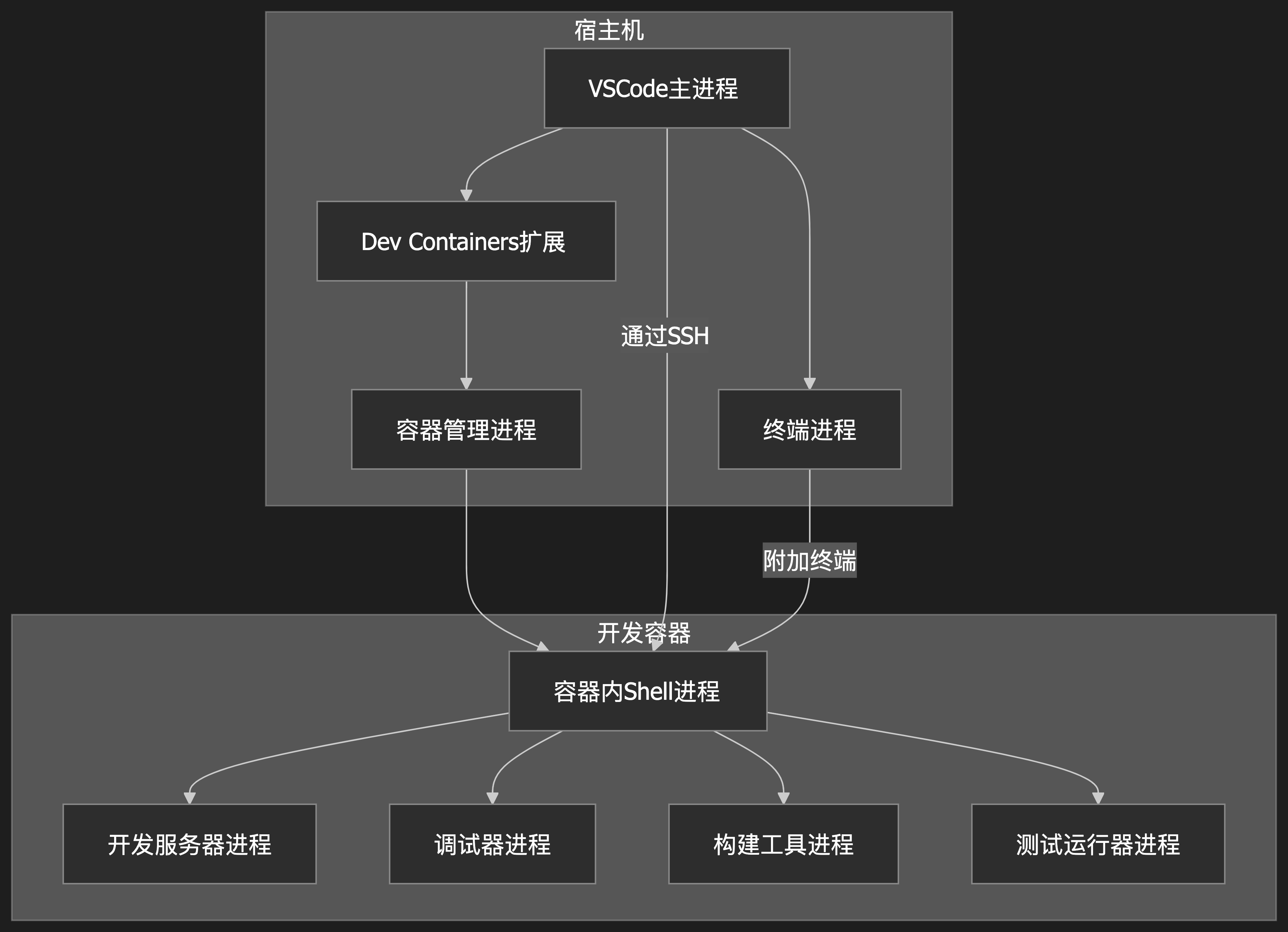
vscode的devcontainer组件架构
|
1 2 3 4 5 6 7 8 9 10 11 12 13 14 15 16 17 18 19 20 21 22 23 24 25 26 27 28 29 30 31 32 33 34 35 36 37 38 39 40 |
# VSCode DevContainer 进程关系图 ```mermaid graph TD subgraph 宿主机 A[VSCode主进程] --> B[Dev Containers扩展] B --> C[容器管理进程] A --> D[终端进程] end subgraph 开发容器 C --> E[容器内Shell进程] E --> F[开发服务器进程] E --> G[调试器进程] E --> H[构建工具进程] E --> I[测试运行器进程] end A -->|通过SSH| E D -->|附加终端| E ``` ## 图例说明 1. **宿主机侧进程**: - VSCode主进程:运行在宿主机上的VSCode核心 - Dev Containers扩展:管理容器生命周期 - 容器管理进程:负责启动/停止开发容器 - 终端进程:用户打开的终端窗口 2. **容器内进程**: - Shell进程:容器内的主shell环境 - 开发服务器:如vite/webpack等 - 调试器:如node-inspector - 构建工具:如rollup/webpack - 测试运行器:如jest/mocha 3. 连接关系: - VSCode通过SSH协议与容器内进程通信 - 终端可以附加到容器内的shell进程 - 容器管理进程控制整个容器的生命周期 |
windows上ollama安装
- 如果使用 OllamaSetup.exe ,那么默认安装位置为:~\AppData\Local\Programs\Ollama ,安装过程中没法选择别的安装位置; 我是因为这个安装文件比zip安装包小很多,就选择了这种安装方式
- 如果C盘目录不足的话,安装后将该目录移动到D盘,然后创建一个软连接就行了
- 安装后的Ollama大约5GB,为啥这么大呢?主要大文件有如下几个:
- Ollama\lib\ollama目录下的三个目录:
- cuda_v11 1.1G 我安装的是V1.28的驱动,所以这个也用不着
- cuda_v12 1.95G
- rocm 1.93G 这个是AMD CPU才用得着的,我的inter CPU NVIDIA显卡,用不着
GPU的并行处理
- GPU不能像CPU那样通过时间分片实现伪并行
- CPU 的上线文切换只需要保存几个寄存器就可以了,切换成本相对较低
- GPU计算通常都有很多计算单元和数据的,显存数据量通常GB级别,强行切换的成本很高
- GPU也能多任务并行
- 相比CPU,GPU的是真正意义上的多任务并行
- 应用程序只需要提交任务给GPU,GPU自己来安排任务到合适的核心上
CPU的超线程
CPU的超线程本质上是硬件层面的虚拟化,把原本的4个CPU核心伪装成8个CPU核心,真正干活的还是4个CPU核心,这不是骗人吗?
这个没有骗人,只是骗操作系统内核而已;这样能提高效率吗?
加入现在系统中有4个线程在工作,刚好有4个CPU核心,每个进程用完自己的CPU分片之后,发现没人跟自己抢CPU,接着运行就行,不需要上线文切换,跑的很好;
过了一段时间,又来了4个线程,于是出现8个线程使用4个CPU的情况,每个时间片用完之后都需要保存寄存器、切换上下文操作,都不产生实际价值。
管理员意识到这个问题之后,开启了CPU的超线程模式;对于内核来讲,就是8个线程使用8个CPU,不需要上线文切换了,这种不产生实际价值的操作就不用做了。
话说还是8个线程争抢4个物理CPU啊?
确实如此,但是现在的争抢是发生在CPU内部的,不需要太多的寄存器内容保存到内存的操作,效率会高一些。
举例说明:
银行柜台有4个服务员,每个服务员一个窗口,每个窗口前面一把椅子,客户听到叫号之后,做到对应的椅子上,开始办理业务,偶尔服务员进行操作,用户闲着,偶尔服务员让客户提供材料或输入密码,服务员等着;
经理看到这种现象,就想能不能让客户找材料的时候让服务员处理下一个人的业务?(这个经理大概率以前是搞计算机的)
然后,经理就让服务员在等用户找东西的时候,让用户离开座位回去找,接着叫下一个客户。
问题就出现了,一方面客户离开的时候要把自己的东西都拿走,服务员手里的关于该客户的东西也要正确收纳起来,效率反而下降了。另一方面客户贼不高兴。
经理肯定能看出这样搞不行了,经理就回想起来了计算机中的超线程,使用超线程的方法进行优化方案如下:
- 每个服务员都开两个窗口,4个服务员(物理CPU),共8个窗口(超线程)
客户在办理完业务之前,是不需要离开自己座位的,只有服务员在幕后自动切换位置,每个客户提交给服务员的资料也都在各自窗口的办公桌上放着,每个办公桌上也都有自己单独的电脑。
经过优化之后,任务的吞吐量提高了10%,经理获得了一个创新奖,服务员的显然比以前更累了,经理当然也看得见,于是每个服务员加薪15%。
超线程的不适用场景:
- 当系统线程数量小于物理CPU数量时,超线程发挥不了作用
AI答案:
对于8个线程CPU满载的情况下,4核心物理CPU在开启超线程的情况下,是否能体现出超线程的优势?
在 4 核心物理 CPU 开启超线程(变为 8 个逻辑核心)且运行 8 个线程并导致 CPU 满载的情况下,超线程的优势通常难以体现,甚至可能出现性能下降。以下是具体分析:
一、超线程的核心机制与资源共享特性
- 超线程的硬件设计本质
-
- 每个物理核心通过超线程模拟出 2 个逻辑核心,但共享执行单元(如 ALU、FPU)、缓存、内存控制器等关键资源。例如:
-
-
- 4 核 CPU 开启超线程后有 8 个逻辑核心,但实际执行计算的硬件单元仍为 4 组。
-
-
- 逻辑线程的 “并行” 本质是分时复用物理核心的资源,而非真正的独立硬件并行。
- 资源竞争的关键场景
-
- 当 8 个线程全部满载时,每个物理核心的 2 个逻辑线程会同时争夺同一组执行单元、缓存带宽等资源。例如:
-
-
- 逻辑线程 A 正在执行浮点运算(占用 FPU),逻辑线程 B 也需要执行浮点运算时,必须等待 A 完成,导致流水线停顿。
-
二、8 线程满载时超线程的性能表现
- 理想情况(理论上的 “优势”)
-
- 若 8 个线程的指令类型完全不冲突(如线程 A 用 ALU,线程 B 用 FPU),超线程可能通过资源分时复用提升利用率。
-
- 但这种场景在实际应用中极为罕见,尤其是计算密集型任务(如科学计算、渲染)中,线程通常需要大量同类运算资源。
- 现实情况(性能瓶颈)
-
- 执行单元竞争:当两个逻辑线程同时需要使用同一类型的执行单元(如整数运算、浮点运算),会产生 “资源冲突”,导致其中一个线程被迫等待,实际吞吐量接近单线程性能的 2 倍(而非理想的 2 倍)。
-
- 缓存一致性开销:两个逻辑线程共享 L1/L2 缓存,频繁的数据读写会增加缓存一致性协议(如 MESI)的开销,降低缓存效率。
-
- 内存带宽瓶颈:8 个线程同时访问内存时,内存控制器的带宽可能成为瓶颈(尤其在双通道内存配置下),导致整体性能下降。
三、实际测试数据与案例
- 测试环境:4 核 8 线程 CPU(如 Intel i5-1135G7),运行 8 个计算密集型线程(如 Prime95 烤机)。
- 性能对比:
-
- 开启超线程:CPU 利用率 100%,但单核性能因资源竞争可能下降约 10%~20%,整体多线程性能接近 4 核物理核心的 1.2~1.5 倍(而非 2 倍)。
-
- 关闭超线程:8 个线程被调度到 4 个物理核心,每个核心运行 2 个线程(操作系统级上下文切换),此时单核性能更稳定,但多线程吞吐量可能与开启超线程时相近或略低(取决于任务调度效率)。
- 结论:在极端满载的计算密集型任务中,超线程的优势微弱,甚至可能因资源竞争导致性能低于预期。
四、超线程优势的适用场景
超线程的显著优势通常出现在以下场景:
- 线程数少于逻辑核心数:如 4 线程运行在 8 逻辑核心上,此时物理核心的资源未被占满,超线程可利用空闲资源并行处理。
- 任务混合 IO 与计算:部分线程因 IO 等待(如读写硬盘、网络)处于空闲状态,超线程可让物理核心切换到其他计算线程,减少资源浪费。
- 轻负载多任务场景:如同时运行浏览器、文档编辑、后台程序等,各任务对 CPU 资源的占用不均,超线程可提升整体响应速度。
五、总结:8 线程满载时超线程的价值
- 核心结论:4 核 8 线程 CPU 在 8 线程满载时,超线程的优势难以体现,甚至可能因资源竞争导致性能下降。
- 本质原因:超线程的设计目标是 “利用空闲资源提升利用率”,而非 “为完全满载的任务提供额外算力”。当物理核心的资源被完全占用时,逻辑线程的并行会退化为 “资源争夺”,抵消超线程的优势。
- 建议:若任务长期处于 8 线程满载且为计算密集型,关闭超线程(使系统仅识别 4 个核心)可能让每个物理核心专注处理 1 个线程,减少资源竞争,获得更稳定的性能。
vscode中gopls server 启用静态检查
在settings.json中添加:
|
1 2 3 |
"gopls": { "ui.diagnostic.staticcheck": true, } |
APP逆向神器之Frida【Android初级篇】-腾讯云开发者社区-腾讯云
windows磁盘空间清理
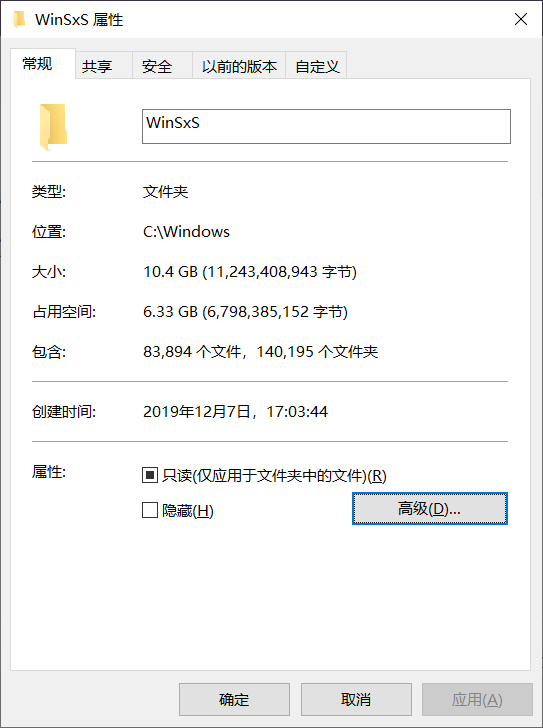
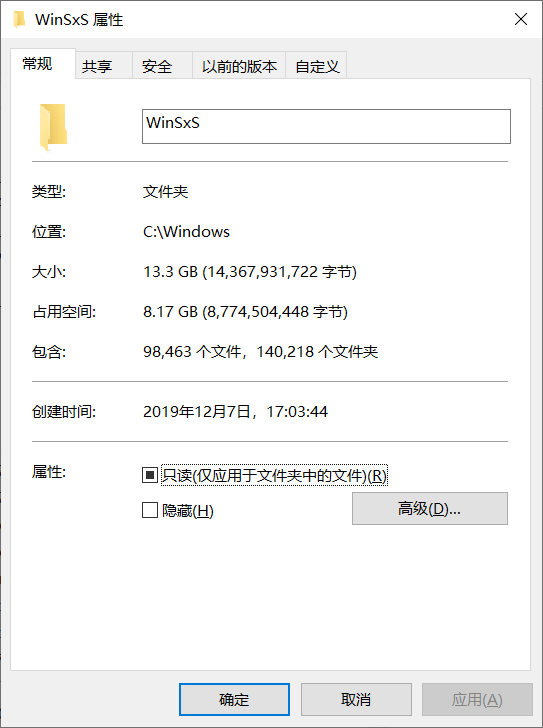
这个目录太大了
使用C盘的“磁盘空间清理”功能试试
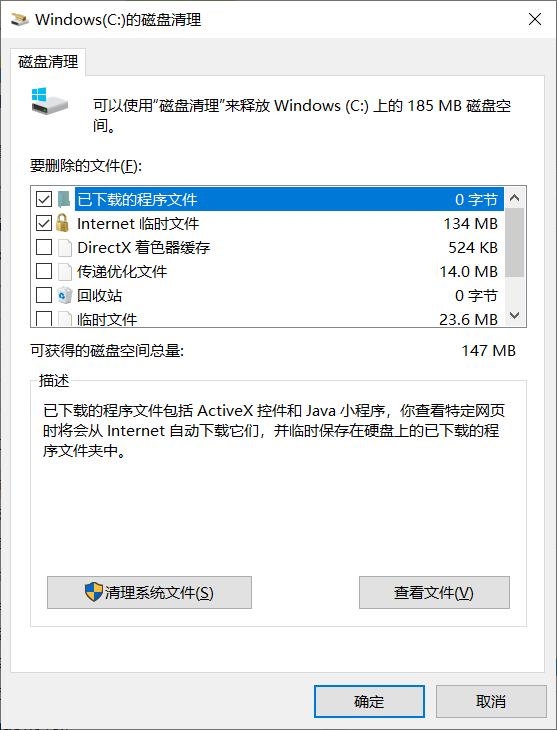
点击“清理系统文件”
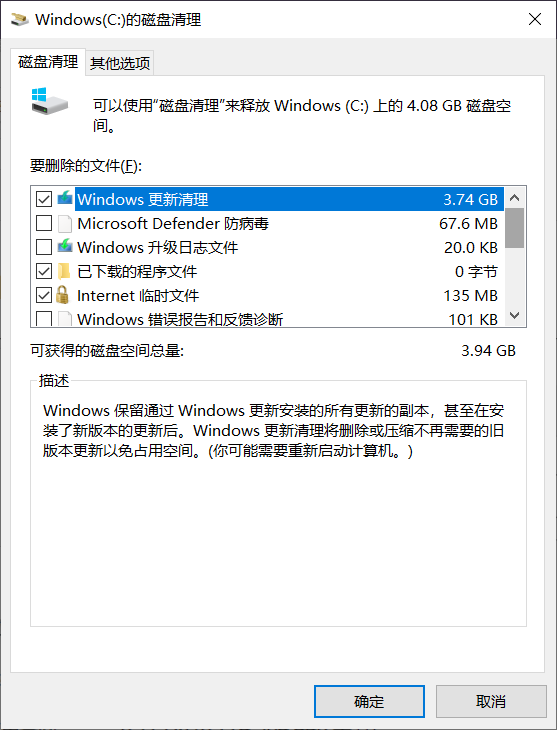
C盘空闲8.4G,清理后应空闲12G
执行后(winsys目录减小了约3GB,清理约1.5万个文件,还是太多):